DE

Plan, review and document firewall rules and ACI contracts in one place

Permitra replaces the Excel communication matrix: security rules are created in a traceable workflow with review and four-eyes approval, validated against the zone matrix, and exported as ready-to-apply configuration for Juniper SRX, Check Point and Cisco ACI – Permitra is the source of truth for the intended state, while devices are still configured through the vendors' management tools.

What is Permitra?

Permitra is a planning and documentation tool for network security rules. Requests are raised, reviewed, approved and documented with full version history. Implementation still happens in the vendors' tools (Check Point SmartConsole, Juniper CLI, Cisco APIC) – Permitra generates the matching configuration to apply and its drift comparison shows where documentation and the actual device configuration diverge.

Why Permitra? – The story behind it

Permitra was born from practice: its author has delivered many cloud infrastructure projects as a solution architect – every single one accompanied by Excel sheets full of security rules. Permitra is the resulting vision of how security rules can be planned, approved and documented properly instead.

Transparency: Permitra was built with Claude, Anthropic's AI coding assistant. With limited programming skills of their own, the author was able to translate that vision into a working solution: the domain knowledge, architecture principles and workflows come from real project practice – the implementation grew out of an iterative dialogue with the AI. That is also part of why Permitra is open source: so experienced developers can review the code critically and use the ideas as inspiration.

Features

Rule workflow with approvals

Unique rule IDs, draft → in review → approved → active, where “active” only applies once operations has confirmed the rollout on every component. Version history, comments, recertification of expiring rules. Nothing is ever deleted: a rule that is no longer needed gets the status “deleted” and stays visible. The three-in-the-morning case has its own deliberately narrow path: the rule already in place is documented afterwards and expires by itself without an approval.

Security zones (BSI model)

Zone communication matrix (allow/block) with the P-A-P model: zone transitions always cross a firewall, ACI only applies within a zone. Matrix changes require two approvals.

Network registry

Every network belongs to exactly one zone. Source and destination zones of a rule are derived automatically from its addresses – mapping changes go through the approval workflow.

Automatic component resolution

From source and destination, Permitra determines on which firewall clusters or ACI fabrics a rule must be implemented – including an implementation status for operations.

Practical exports

Juniper SRX set commands, Check Point mgmt_cli and Management API, Cisco ACI contracts (EPG-based, incl. PBR service graphs), host firewalls (nftables, firewalld, iptables), CSV and JSON. The built-in Capirca/Aerleon integration adds Cisco IOS/ASA, Palo Alto, zone-based SRX and iptables – or Capirca policy YAML for existing pipelines.

Analysis & drift

Address search and path analysis: the route is derived from the documented links between the firewalls – several firewalls in a row is the normal case in an enterprise. Where there is no way through, the analysis says so; where there are two redundant ones it shows both, because a rule on only one of them holds until the failover. Plus conflict and risk warnings, and drift comparison against uploaded device configurations. The comparison answers both directions: did my rules arrive – and conversely, is every rule on the device backed by an approved security rule? And it checks that the rule on the device permits only what was approved.

Per-application reports

Every rule carries an APP-ID; from it you can generate a CSV report of all rules for an application – handy for audits and application reviews.

Tamper-evident logging & SIEM

Sign-in, admin and access events are logged append-only with source IP and secured against tampering by a SHA-256 hash chain – any later change stands out, even one made directly in the database. Delivery to a SIEM is reliable (at-least-once) and survives restarts as well as outages.

Automation: API & NetBox

Read-only API tokens connect Ansible/Terraform; network prefixes import directly from NetBox (preview before commit). Authentication with 2FA/passkeys and login lockout.

Screenshots

Captures from the public demo with sample data – from the dashboard overview to tamper-evident audit logging.

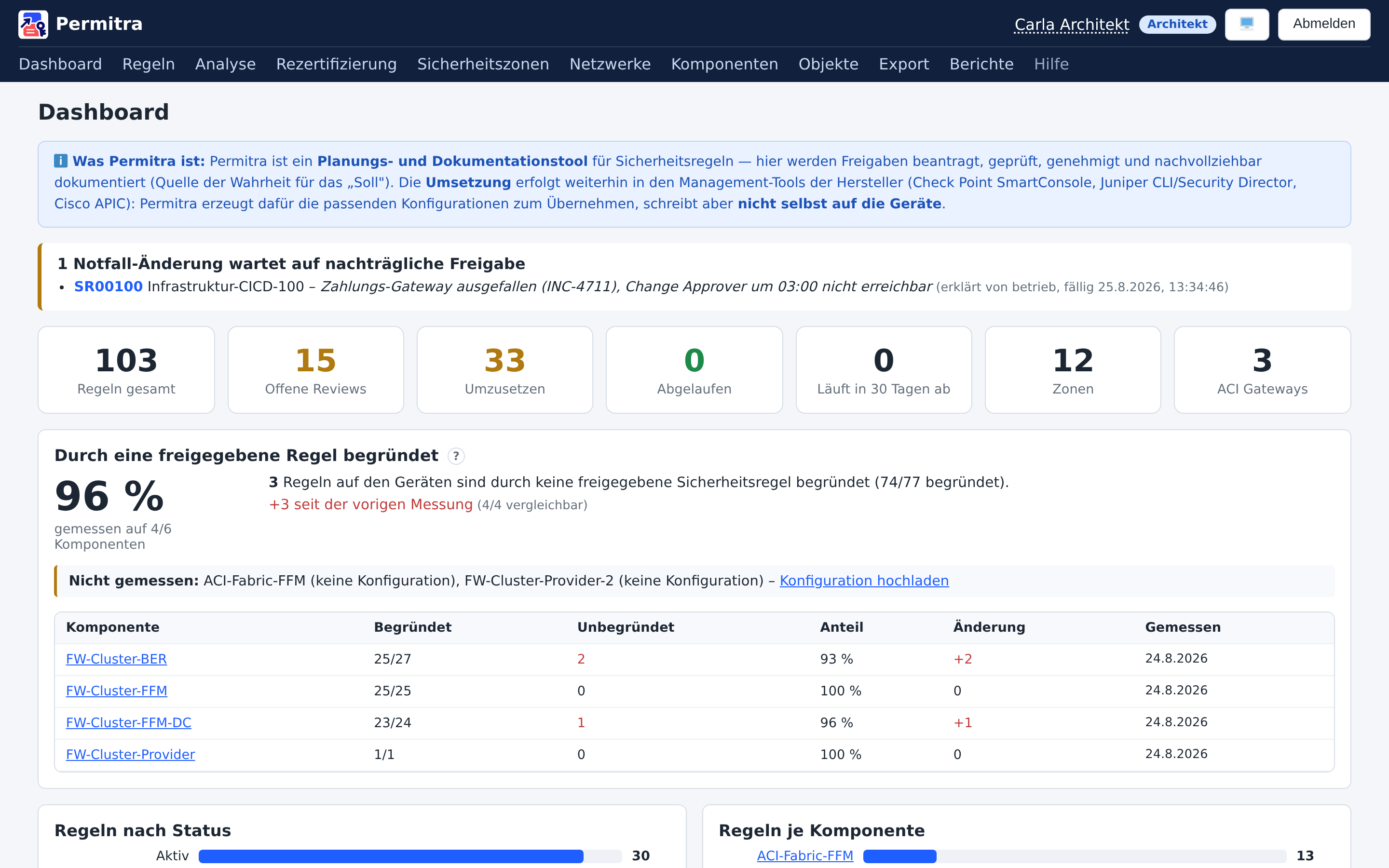
Permitra Dashboard
Dashboard: rules by status, distribution across firewall clusters/ACI fabrics and the latest changes at a glance.
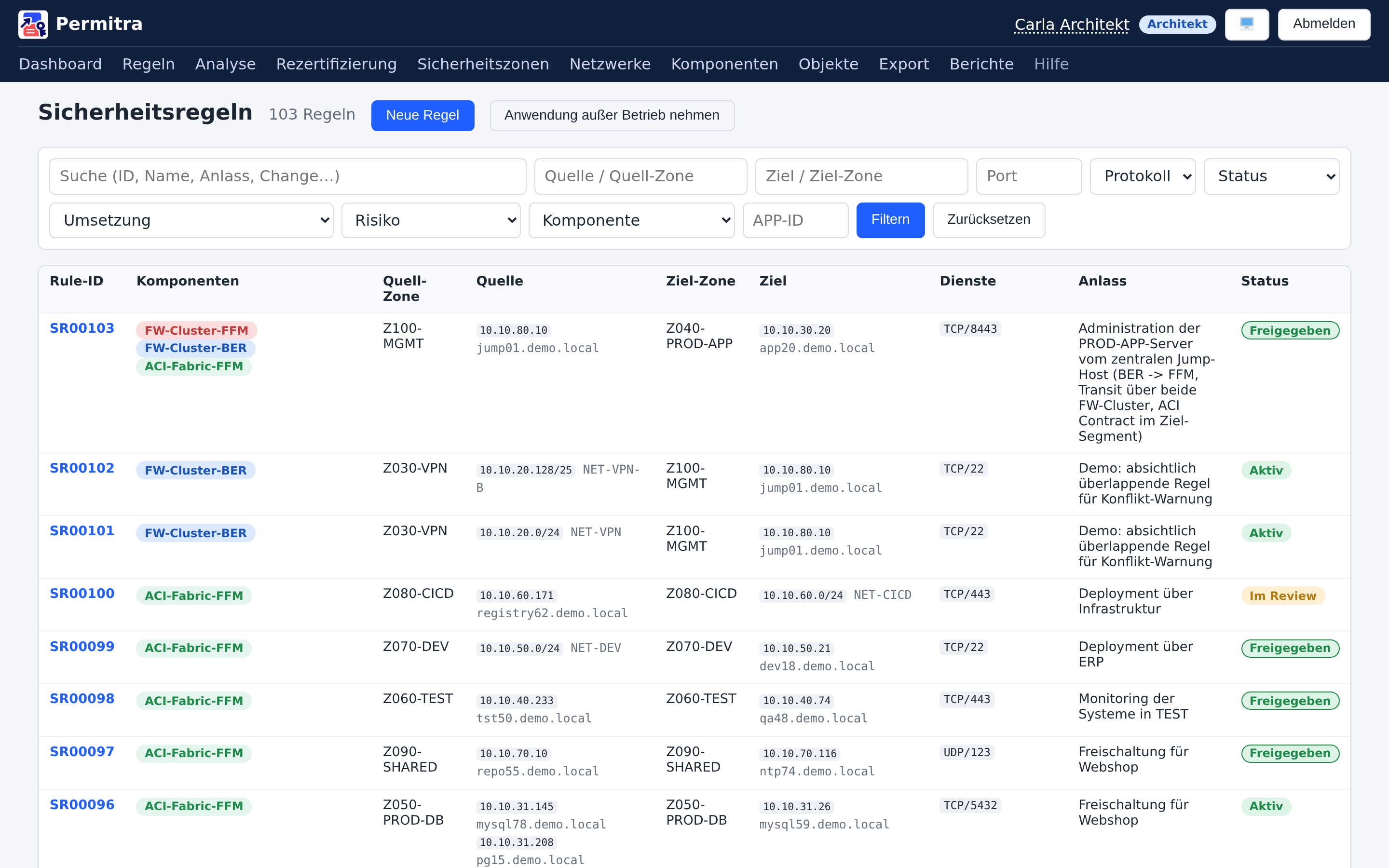
Regelübersicht
Rule set: unique rule IDs, derived source/destination zones, services, implementation components and approval status – filterable by APP-ID and risk.
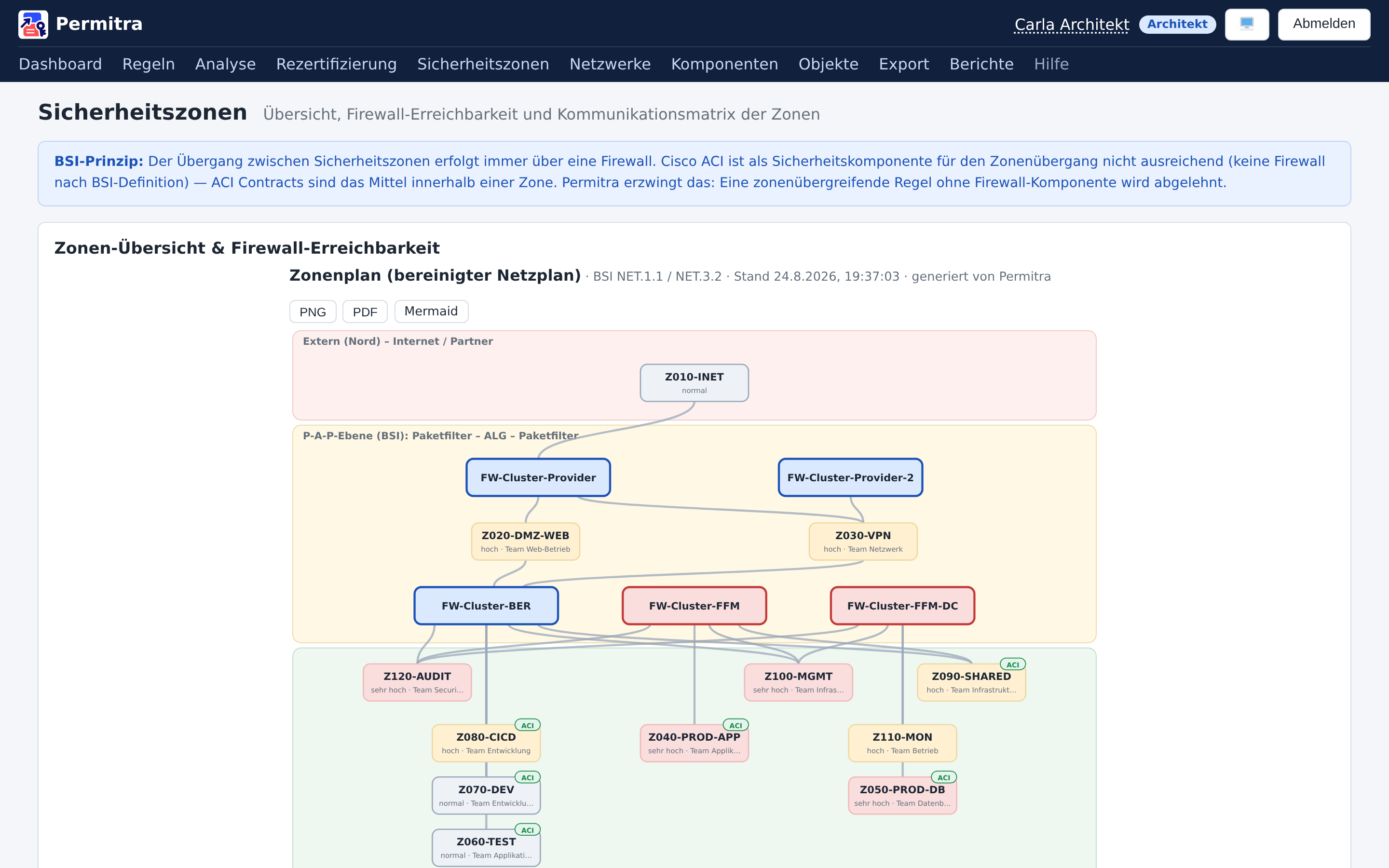
Zonenplan
Zone diagram (BSI): auto-generated network plan following the P-A-P model with zone IDs, protection levels and ACI markers.
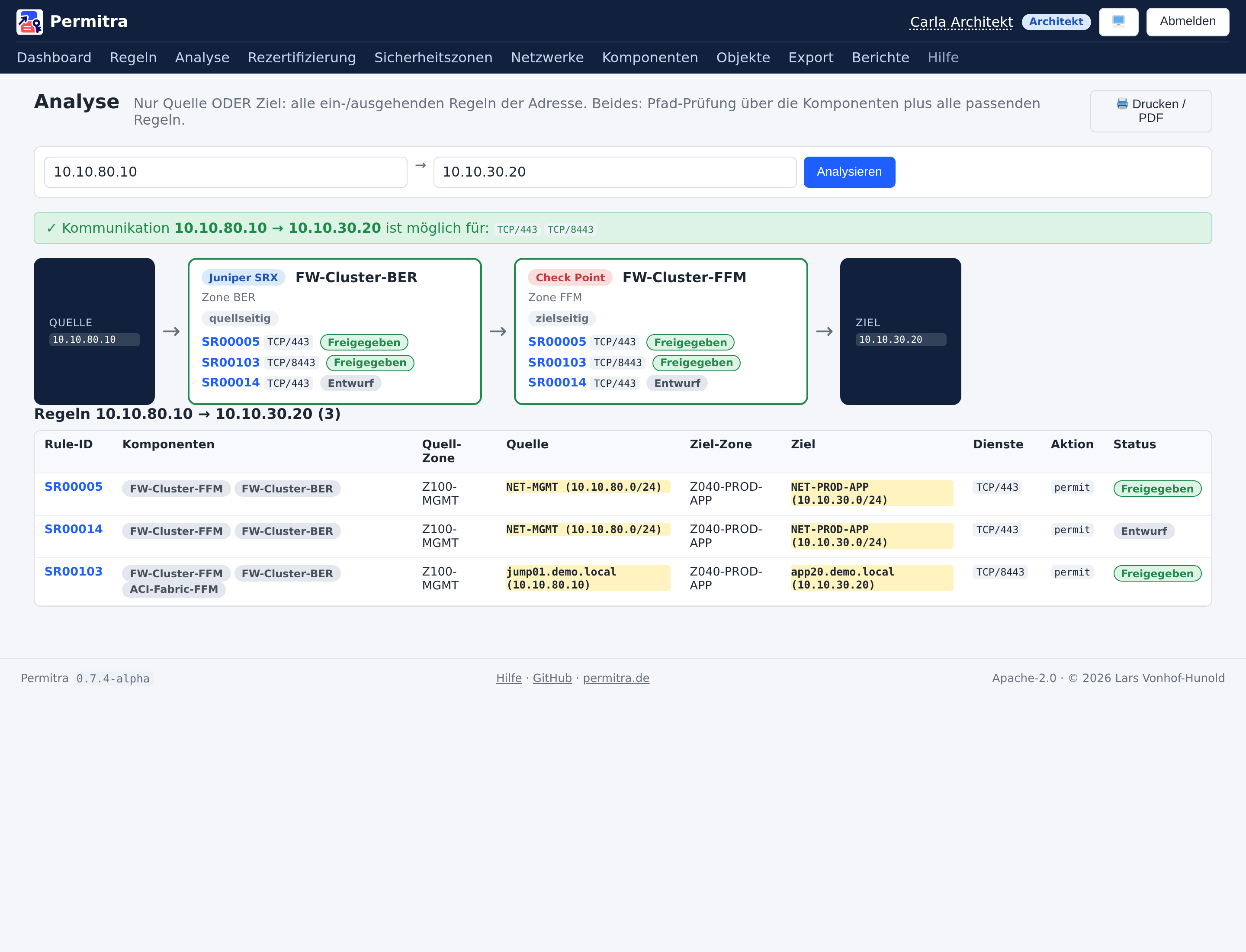
Pfad-Analyse
Analysis: path check source → destination across every firewall cluster and ACI fabric involved, including the matching rules – with print/PDF output.
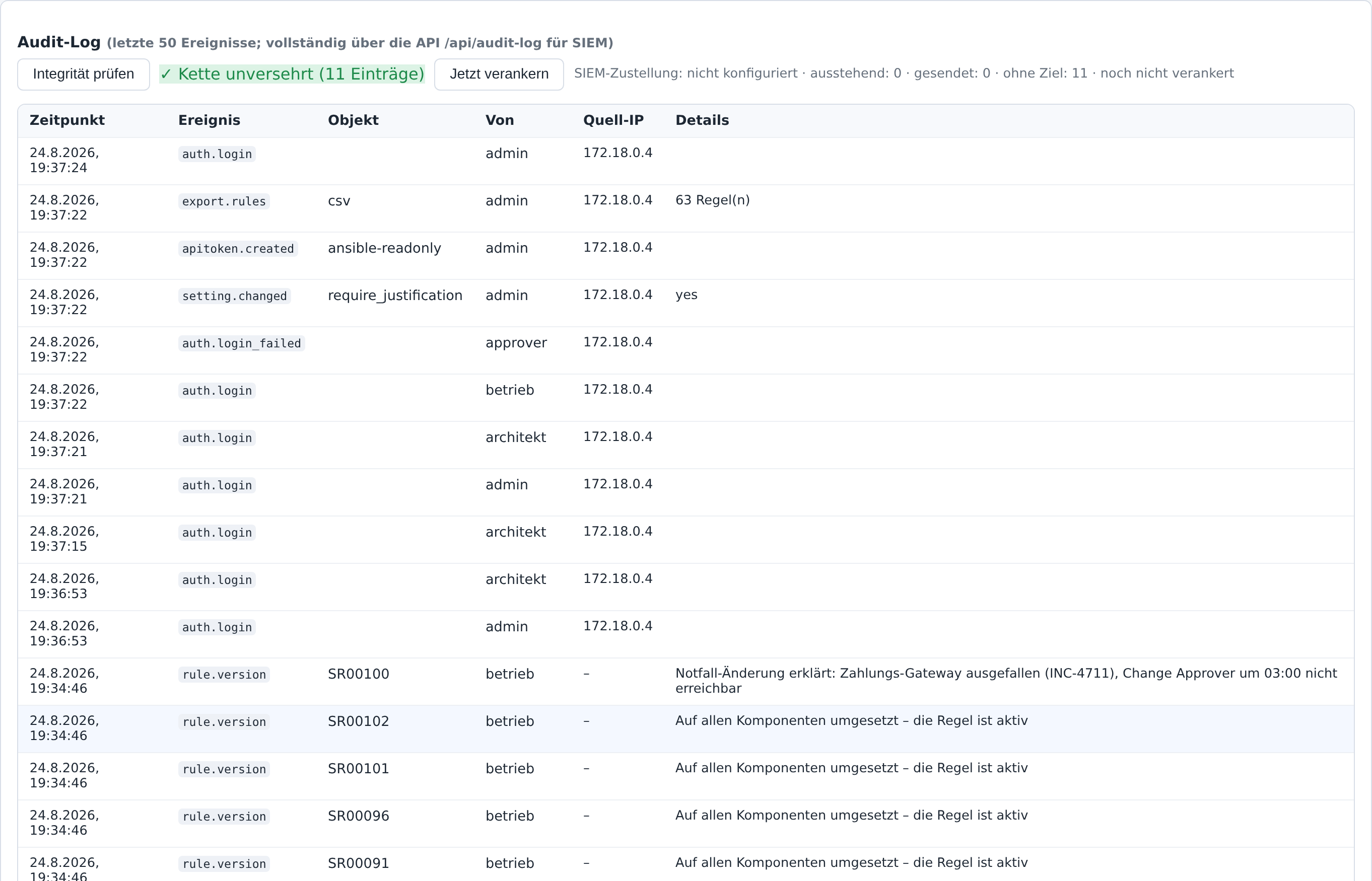
Audit-Log
Audit log: tamper-evident logging of sign-in, admin and access events with source IP – fully streamable to a SIEM via the API.

BSI requirements: what Permitra covers – and what it does not (yet)

Permitra follows the German BSI IT-Grundschutz requirements for security zones and rule documentation. Here is the honest status:

✅ Covered

  • Zone documentation: name, purpose, owner, protection level per goal (C/I/A, maximum principle), P-A-P classification
  • Zone transitions only via firewalls – hard-enforced (ACI intra-zone only)
  • Least privilege: allow/block matrix, optional default-deny for unmaintained relationships
  • Generated zone diagram and component topology
  • Rule set with unique IDs, service-precise rules, version history and person-attributed approvals
  • Multi-stage approval with the four-eyes principle (two approvers for zone/matrix/network changes)
  • An account can hold several roles – small teams do not have four people for four roles. The four-eyes principle is untouched: the checks key on the acting account, not on a role. Two hats on one person is still one pair of eyes.
  • Impact analysis: matrix changes show affected rules; allow→block resets approved rules to review
  • Temporary rules: automatic deactivation on expiry, recertification
  • Drift comparison against device configurations – including coverage: which rules on the device are backed by no approved security rule. And one level deeper: does the rule on the device permit only what was approved? Narrower is fine, wider is a finding – a rule widened during an incident keeps its ID and would otherwise read green.
  • Retiring an application: when an application is replaced, all its rules are proposed for removal – decided one at a time, with a preview, and whoever starts it cannot approve the removals
  • Rollback to an earlier rule version (as a new version – the history stays complete)
  • Emergency change: a rule already opened on the firewall is documented afterwards – reason mandatory, goes into review, and deactivates itself without an approval after the fact; its own audit entry, so how often it happens stays countable
  • Encrypted backups (gpg) with a rehearsed restore path – the dump holds password hashes, TOTP seeds and the audit chain
  • Enforceable mandatory fields per rule: justification, owner and validity (toggled by admins)
  • Risk analysis: warnings for any-to-any and risky services, CIA-weighted scoring
  • Tamper-evident audit log: sign-in, admin and access events with source IP, append-only with soft-delete
  • Retention for the audit log: expired segments are deleted behind a seal that keeps the chain provable – personal data goes, the proof stays verifiable. With no period configured, nothing is deleted.
  • Evidence report for audits: every change in a period with requester, approver, justification and date – including the chain verification and whether the audit log still covers the window
  • Tamper detection via SHA-256 hash chain: any change, reordering or removal of an entry is detected – even directly in the database
  • Reliable SIEM delivery (at-least-once): events survive restarts and sink outages and are delivered in order once it returns (syslog/webhook)
  • Email notifications for review, approval and recertification; activation/reset
  • Authentication: 2FA (TOTP) and passkeys, login lockout after failed attempts, role-based access
  • Automation: read-only API tokens (Ansible/Terraform) and NetBox import of network prefixes

🟡 Partially

  • Change management: generic webhook available, concrete ServiceNow adapter open

🔴 Not covered

  • AD/LDAP sign-in (local accounts with 2FA/passkeys available)
  • Usage-based detection of stale rules (device hit counters) – requires device adapters
  • Deliberate limits: Permitra never writes to devices itself; routers/switches with ACLs and pure FQDN rules are not modelled

The open items are tracked as work items in the project backlog and are being implemented step by step.

Live demo

The public demo runs on fictional sample data (12 zones, around 100 rules, 6 security components) and is reset every night.

demo.permitra.de
  • Users – two per role, so the four-eyes paths can actually be walked: one requests, the other approves: architekt, architekt2, betrieb, betrieb2, approver, approver2, admin, admin2
  • Plus doppelrolle – one account holding two roles (architect and change approver). It may approve other people's rules, but not the ones it requested itself.
  • Password: username + 123
  • Interface in German or English – the administrator sets the language for the whole instance, so screenshots, training and support share one wording; the demo runs in German

Technology

Deliberately lean and self-hosted – a single Docker Compose stack is all it takes.

FastAPI SQLAlchemy + Alembic PostgreSQL React 19 + Vite Docker Compose Capirca / Aerleon JWT / role-based access

Open Source

Permitra is open source under the Apache License 2.0 – free to use, including commercially, with an explicit patent grant. The source lives on GitHub. The current release is 0.7.4-alpha, the first published one: working and tested, but an alpha on purpose – not meant for production yet.